Altimeter Troubleshooting Guide
Got altitude sickness? These four steps should fix it for you:
1. Wait for GPS Hardware Lock
Make sure you wait at least 30 seconds after launching for the GPS hardware to acquire a fix.
2. Go Outdoors
Make sure you're outside and clear of tall structures. Calculating altitude requires a strong lock on 5 satellites, whereas 2D map positioning requires only 3.
3. Check Location Services Settings
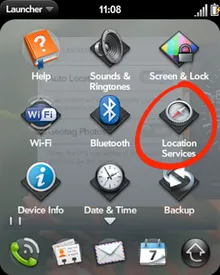
Ensure GPS is enabled under Location Services on your webOS device:
1. Open Location Services
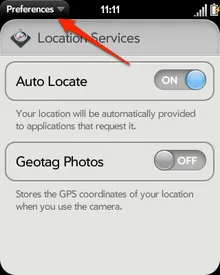
2. Select Preferences
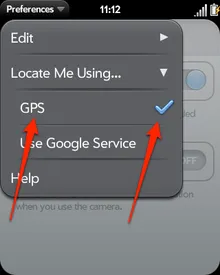
3. Check GPS Box
4. Soft Reset webOS Hardware
If the GPS hangs on the Pre, perform a quick reset by holding Orange Key + Sym + R simultaneously.
Verizon Palm Pre Plus Note: Some Verizon users experienced specific GPS hardware locks that resolved after two consecutive reboots.